Comparison of Online vs Offline Sex Worker Websites
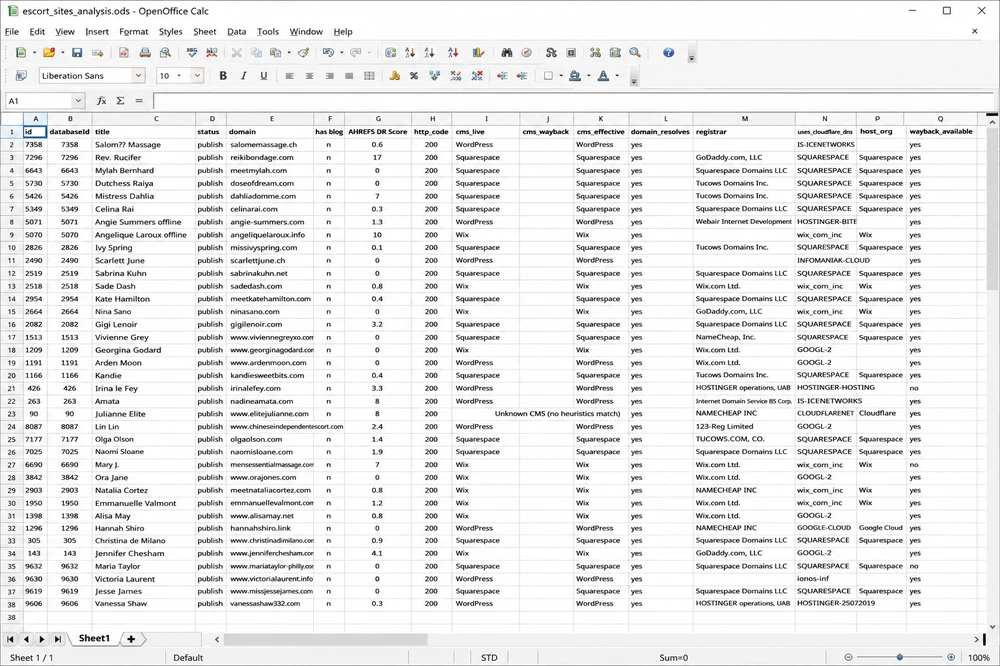
With help from the brilliant Josey from Lovesudo, I’ve recently run a script to determine for each of the 4607 sites indexed on Sex Worker Search their http code (200 online, 404 offline etc), the Content Management System (CMS) ( Content Management System is computer software used to manage the creation and modification of digital content) used to build the site, whether the domain resolves (correctly points to a live server IP address), the domain registrar (A domain registrar is the company where you register and renew your domain name. eg Namecheap, GoDaddy etc), whether each site uses Cloudflare or not, hosting company (A hosting company stores the files and database that make your website accessible online), whether the site is archived on Wayback Machine (an archive site that stores snapshots of websites as they were on past dates even if that site is now offline), if it is, the URL of the archive, and the timestamp of the most recent Wayback archive.
I’ve collected and analysed this data in hopes of drawing some conclusions as to what we can do to avoid our sites going prematurely offline and how to maximise the success of our personal websites in terms of SEO, search ranking and site visitors.
The Dataset and What I Analysed
Offline Sites
Sex Worker Search is a search engine indexing the personal websites of independent providers.
Last month, in March 2026, I did a big tidy up removing all of the sites from the index that had gone offline in the past 4 years.
The first website indexed on Sex Worker Search was my site in April 2022.
Out of 4607 sites indexed between 2022 and 2026, 2,694 (58.5%), were still online.
1,913 (41.5%) were offline.
Nearly 2 in 5 sites are offline after 4 years.
From now on I’m going to do frequent, regular scans and remove offline sites.
The numbers of offline sites were way higher than I expected.
Based on the careers of my friends, acquaintances and duo partners, I had assumed that most sex workers who have built and maintained their own personal websites would stay in business on average for somewhere in the range of 5-10 years.
I was wrong. It seems to be way less than that. More like just a few years.
Lifespans of Sites
Sites indexed on Sex Worker Search are not brand new at the time of indexing but we can look at Wayback archives and measure the average lifespan of a SW website.
Wayback Machine shows the timestamp for the first recorded archive of a site and the most recent.
Currently my data just has the dates of the most recent timestamp but I’ll see about running a script to get the first timestamp for each offline site and then we can estimate the average lifespan of a SW site.
Implications of a site going offline
A site going offline isn’t necessarily a bad thing vs a site having greater longevity isn’t always a good thing. eg the site might go offline because someone has reached their financial targets in the industry and happily retired or moved on to pursue other opportunities. A site might stay online when someone would prefer to retire and do something else but can’t afford to leave sex work.
But I think there are choices we can make regarding our websites that improve our chances of running a successful and profitable sex work business and I hope looking at some statistics around the sites that have gone offline will reveal some outliers indicating design choices to avoid. eg CMS, site builders and hosting companies that may be banning us and taking our sites offline.
Average SW site lifespan compared to non SW sites
SW site lifespans are short.
Maybe not that short compared to the overall average lifespan of a website.
I’d like to find a study that’s used a large dataset to calculate this.
I’ve looked at a variety of estimates saying 3 years, 5 years, 7 years etc but nothing that looks like an estimate from quantifiable data.
Reasons why a SW site might be offline
Quit/retired
Rebranded
Lost domains
Stopped paying hosting
Didn’t renew SSL
On hiatus
Things to look at
CMS survival rates
Domain TLD survival (.com vs .ch vs .co.uk)
Cloudflare correlation
Hosting differences
Domain resolves vs HTTP fails
CMS, Hosting and Infrastructure
Offline rate by content management system CMS
Unknown 57.9%
Wix 35.7%
WordPress 33.8%
Squarespace 30.4%
Joomla 41.7%
Shopify 50% (tiny sample)
CMS (Content Management System) means the software used to build and manage a website, eg WordPress, Wix or Squarespace.
Wix, WordPress and Squarespace are all very similar in terms of offline rate. I was expecting to see WordPress dot org sites surviving longer in that Wix and Squarespace are site builders favoured by people less tech savvy and perhaps less invested in putting in the time and effort to build a WordPress site. It would make sense for Wix and Squarespace to be treated as more disposable.
SWS does not index site builder sites with the name of the sitebuilder in the domain name. If these were included, I’m sure WordPress sites, where someone has bought their own domain name, would have much greater longevity in comparison.
Shopify is unsurprisingly not popular and has a high offline rate. They’re known to be anti sex work.
Host Count
Squarespace 855
Wix 545
Google (GOOGL-2) 303
Cloudflare 216
OVH / AT-88-Z 160
AWS 90
Infomaniak 69
Google Cloud 65
Hostinger 62
Euclid NL 49
Automattic (WP) 47
GoDaddy 42
Observations About Host Count
Squarespace & Wix are massively over-represented in this data set compared to the web overall.
According to Colorlib, Wix powers 4.3% of all websites and Squarespace powers 2.5% of all websites.
6.8% combined.
In my dataset, Wix + Squarespace combined host about 30% of SW websites.
These site builders are popular with non-technical users, solo operators and people who want a fast setup.
Via word of mouth recommendations, these site builders seem to get a lot of mentions in SW communities.
eg Mentions of Wix on the /r/sexworkers subreddit and mentions of Squarespace.
GoDaddy is under-represented.
only ~42 sites.
Whenever GoDaddy gets mentioned by a SW in my experience, it’s usually to say they’re unethical, untrustworthy and anti SW so it’s likely they’re just not popular due to poor reputation in our community but it’s also possible they are banning us.
In comparisons of Wix, Squarespace and WordPress dot org, sites like XposureCreative, Yellowball, and Polyspiral all rate WordPress dot org as the best for SEO.
Why not to use Wix or Squarespace site builders
Site builders like Wix and Squarespace bundle hosting, templates and editing tools into one managed platform. Self-hosted WordPress.org sites instead run on independently rented hosting and offer far greater flexibility, portability and SEO control.
Wix and Squarespace might be beginner friendly but you’re then limited in terms of customisability and don’t have access to powerful SEO tools available on WordPress like Yoast or Rank Math.
Also site builders, especially Wix, try hard to lock you in so if you decide later you want to move off their platform, they’ll make that as difficult as possible for you.
WordPress dot com is anti sex work
Automattic, AKA WordPress dot com, (as opposed to WordPress dot org where you install your own instance of WordPress on your own hosting and are not bound by Automattic restrictions) is not popular with Sex Workers. Only 47 sites in my data set. This is consistent with the fact that WordPress dot com are anti sex work and well known for banning our sites.
Cloudflare Offline rate
Not using Cloudflare = 42.3% offline
Using Cloudflare = 19.9% offline
The rest are unknown as to whether they’re using Cloudflare or not.
People not using Cloudflare are much more likely to have gone offline than those using it.
Interpretation
More technical users
Better domain/infra management
Better protection from hacks, hijacks and things that can break your site eg expired SSL.
Cloudflare isn’t expensive but I guess anything that represents an ongoing cost is going to correlate with people who are more invested in their web presence.
Dead Domains vs Broken Sites
1,132 sites=domain dead
781 sites= domain alive but site broken
The main failure modes
1. Domain expiry / abandonment (majority)
2. Hosting/site breakage (minority)
Host Offline rate
Squarespace 17.8%
Wix 20.7%
Google (GOOGL) 19.1%
Cloudflare 19.9%
OVH / AT-88-Z 9.4%
AWS (AMAZO-4) 4.4%
Infomaniak 2.9%
Euclid NL 2.0%
1. Big platforms ≈ average churn
Wix / Squarespace / Google all ~18–21%
2. Smaller infra providers = much lower churn
AWS, Infomaniak, EU hosts = very stable
Interpretation
Look at the terms and conditions when choosing a hosting company. If they say they will ban you if you’re a sex worker, don’t use them. They may never notice you’re breaking their rules and your site might survive on their hosting just fine but do we really want to give our money to platforms that are anti sex work?
Domains, DNS and Website Stability
Offline rates for different Top-Level Domains
.co.uk
Online = 64
Offline = 44
Total = 108
Offline rate = 44 / 108 = 40.7%
.ch
Online = 101
Offline = 63
Total = 164
Offline rate = 63 / 164 = 38.4%
.com
Online = 2358
Offline = 1315
Total = 3673
Offline rate = 1315 / 3673 = 35.8%
Interpretation
This was surprising. I thought I had a lot more dot co dot uk sites and I would have expected the .ch sites to have the lowest offline rate.
Overall, domain extension alone does not appear to be a strong predictor of website survival.
I’d still recommend dot ch.
.ch is Switzerland’s country-code TLD. Switzerland has historically had a relatively strong privacy culture, generally liberal laws around consensual adult services, strong data protection traditions, and a reputation for legal and financial stability. Because of this, some operators may perceive a .ch domain as a more privacy-conscious or security-oriented choice than more mainstream extensions like .com.
However, a .ch domain does not automatically place an entire website under Swiss law or provide absolute protection. Other factors still matter, including where the site is hosted, which registrar is used, which payment processors are involved, and the actual country where the operator is based and working.
As a result, a .ch domain is probably better understood as a branding signal, a privacy-conscious choice, or a mild jurisdictional preference rather than a guarantee of legal protection or long-term stability.
Cloudflare Surprisingly Unpopular
Only 166 sites out of my data set of 4608 sites are using Cloudflare as their DNS.
DNS (Domain Name System) is the system that connects a domain name like example.com to the actual server hosting the website.
That’s only ~3.6% adoption.
According to W3techs, 22% of all sites use Cloudflare.
Why we should use Cloudflare
- Protection against DDoS attacks and harassment
Cloudflare helps protect sites from malicious traffic, attacks, and targeted attempts to take websites offline. - Hides the real server IP address
Cloudflare acts as a reverse proxy, making it harder for attackers to discover and directly target the hosting server. This means Cloudflare sits between visitors and your hosting server, helping hide the server’s real IP address. - Improves website speed
Its global CDN caches content closer to visitors, helping pages and images load faster worldwide. CDN (Content Delivery Network) means copies of site content are cached on servers around the world so pages load faster for visitors - Free HTTPS/SSL security
Cloudflare makes it easy to secure a site with HTTPS encryption, improving visitor trust and helping SEO. - Bot, spam, and scraper protection
Cloudflare can block spam bots, scrapers, fake traffic, and abusive automated requests that commonly target independent websites.
HTTP codes
HTTP codes are server response codes. For example, 200 means a page loaded successfully while 404 means the page was not found.
The Http codes in this data set
| HTTP code | Count |
|---|---|
| 200 | 2694 |
| 302 | 1 |
| 304 | 1 |
| 401 | 54 |
| 403 | 102 |
| 404 | 285 |
| 405 | 2 |
| 406 | 91 |
| 410 | 7 |
| 412 | 2 |
| 455 | 1 |
| 465 | 4 |
| 500 | 6 |
| 502 | 2 |
| 503 | 14 |
| 525 | 1 |
| 526 | 2 |
| 530 | 1 |
| 999 | 1 |
| no http code | 1336 |
200
Standard response for successful HTTP requests. This is the normal code you’d expect to see for an aonline website where everything is working properly. We used GET requests. Using URL opener to open 50 of the 200 code sites in tabs, I tabbed through to double check and confirmed they were all online.
302
This response code means that the URL of requested resource has been changed temporarily. There was only one instance of a 302 code and when I checked it manually, the site opened normally.
304 Not Modified
This is used for caching purposes. It tells the client that the response has not been modified, so the client can continue to use the same cached version of the response. When I checked the site, it redirected to another site selling domain names.
401 Unauthorized
Similar to 403 Forbidden, but specifically for use when authentication is required and has failed or has not yet been provided. About half of these opened normally and the other half showed a message saying Private Site. This site is currently private. If you’re the owner or contributor, log in. With the “login” as a link to a Squarespace login page. I guess a lot o them were set to private temporarily at the time the script was run and then set to public again since then.
403 Forbidden
The client does not have access rights to the content; that is, it is unauthorized, so the server is refusing to give the requested resource. When I manually checked these sites, most of them were online. Some were offline. A few redirected to spam websites.
404 Not Found
The server cannot find the requested resource. I manually checked 50 of these and most of them were offline.
405 Method Not Allowed
A request method is not supported for the requested resource (for example, a GET request on a form that requires data to be presented via POST, or a PUT request on a read-only resource). Both of these were redirects to domain hijackers.
406 Not Acceptable
The requested resource is capable of generating only content not acceptable according to the Accept headers sent in the request. Most of these sites are online.
410 Gone
This response is sent when the requested content has been permanently deleted from server, with no forwarding address. These were all offline. Most of them show a blank page and one is blank with a link to buy the domain name.
412 Precondition Failed
In conditional requests, the client has indicated preconditions in its headers which the server does not meet. Both of these were online.
455 ODS Error Exception
ODS returned a message with transaction status ERROR. It’s online.
465
I don’t know what this is. 3 of them were online. One gave a Your connection is not private error.
500 Internal Server Error
The server has encountered a situation it does not know how to handle. 3 of these were online and three were offline with “critical error” messages.
502 Bad Gateway
This error response means that the server, while working as a gateway to get a response needed to handle the request, got an invalid response. One of these is online. The other is offline with an error message in Chinese saying “Your IP address is untrusted and has been blocked by the website firewall.”
503 Service Unavailable
The server is not ready to handle the request. Common causes are a server that is down for maintenance or that is overloaded. Half of these were online and half were offline with various error messages.
525 SSL Handshake Failed
Cloudflare could not negotiate a SSL/TLS handshake with the origin server. This one is offline and the error message is as above re SSL handshake failed.
526 Invalid SSL Certificate
Cloudflare could not validate the SSL certificate on the origin web server. One says domain expired and the other says Invalid SSL certificate.
530 Origin Unavailable
Cloudflare was unable to resolve the origin hostname, preventing it from establishing a connection to the origin server. It’s offline with an Origin DNS error.
999 Request denied
Related to being blocked/walled or unable to access their webpages without first signing in. It’s online.
No http code
Most of these seem to be offline. A lot of them have an error page saying “This site can’t be reached.”
No SSL
SSL certificates enable HTTPS encryption, which secures the connection between visitors and a website. Modern browsers often warn users or block access entirely when a certificate is missing or expired.
There are 1148 sites with no http code that are offline. When I manually check them, in most cases chrome just refuses to open the site because it doesn’t have a valid SSL certificate.
No https
Does this mean a common cause of SW sites being offline is people who never set up https or just don’t know how to keep their SSL certificates up to date?
This was surprising. Most site builders do this automatically.
Cloudflare does it automatically.
Or it just means they’ve retired and stopped paying for whatever was renewing their SSL?
Hijacked Domains
I used URL opener to double check the sites the script marked as offline 50 at a time and tabbed through them to see if they’re really offline.
I noticed a lot of the domains had been hijacked by various scammers, spammers, online casinos etc.
A lot of them were SEO spam farms consisting of random keyword content, AI-generated garbage and affiliate links.
Domain squatting happens when a site goes offline, eg when a sex worker retires and stops paying their domain registration fee, and a bot detects an available domain for a site with some value.
The value comes from existing backlinks, bookmarks, and sites still appearing in Google search results.
Squatters then publish some spam under that domain name and parasitise the residual value built by the domain’s original owner.
How to avoid domain name hijack
I recommend leaving your site online for a year or so after you retire with all your pictures and content removed and just a brief “I’ve retired” message.
Over the course of time, your backlinks will drop off, Google will forget you and any regular clients who had your site bookmarked will have realised you’ve retired and stopped visiting your site.
Then when you do let your domain expire, it won’t have enough retained value to be targeted by squatters.
SEO and Blogging
Ahrefs Domain Ranking (DR) scores of sites with a blog vs those without
I manually checked the Ahrefs Domain Ranking (DR) scores of 100 websites without a blog and 100 more sites with a blog to see if there was a significant difference.
There was a huge difference.
| Group | Approx Average Ahrefs DR |
|---|---|
| Sites without a blog | ~3.3 DR |
| Sites with a blog | ~9.2 DR |
DR shows the strength of a website’s backlink profile compared to the others in the Ahrefs database on a 100-point scale.
DR correlates with Google search ranking. So the higher the DR score, the better the chances of that site appearing on page 1 of Google for a given search term.
So the blog sites are averaging roughly:
nearly 3× higher DR
about +6 DR points higher overall
DR is logarithmic-ish in practice:
Moving from DR 1 → 9 is much easier than 40 → 48 but for small independent sites, DR 9 vs DR 3 is a huge visibility gap.
These results strongly suggest:
blogs attract backlinks
blogs create indexable pages
blogs generate long-tail search traffic
(Long-tail search traffic means visitors arriving from very specific Google searches rather than broad competitive keywords.)
blogs encourage internal linking. Search algorithms reward linking between pages on your website.
blogs create reasons for other people to reference the site
Blogging correlates with:
higher effort
SEO awareness
long-term thinking
ongoing engagement with site
Conclusion regarding blogs
Independent provider sites with blogs tend to develop significantly stronger backlink authority than brochure-style sites.
Further Study of sites with vs without blogs
It would be interesting to also look at UR scores, numbers of backlinks and referring domains, organic keywords and organic traffic.
I don’t want to name specific SW sites as examples unless I get consent from the owners but I will try reaching out to the owners of the sites I found with the best DR scores and do a separate post where I interview those people about what they’ve done with their sites overall, and specifically their blogs, that has resulted in such success with their domain ranking.
Final Recommendations
Recommendations based on stats
Don’t use sitebuilders like Wix or Squarespace.
You especially don’t want a sitebuilder site with the name of the sitebuilder in the domain name. It looks unprofessional and leaves you with no scope to improve your search ranking.
Buy your own domain name and pay for hosting otherwise you’re subject to the rules of the site builder and most of them are anti sex work and known to take our sites offline.
Use WordPress dot org.
Don’t use WordPress dot com.
Choose hosting that’s not anti sex work.
Use dot ch for your TLD.
Use Cloudflare for DNS.
Or at least make sure you have something in place that automatically keeps your SSL certificate up to date.
Leave your site online for a year or so after you retire with an “I’ve retired” message to discourage domain name squatters.
Have a blog page on your site and regularly post quality written content on your blog using Yoast or RankMath or similar to format your posts for best SEO outcomes. Make sure your writing is engaging, compelling, entertaining so that real humans will read from start to finish.
Interview with Josey
Out of 4607 sites, 1,913 (41.5%) were offline. Was that more, or less than you would have expected and why was that?
It is not especially surprising. A high turnover rate is common in any self-employed or independent business, particularly in spaces that require constant upkeep and personal labour.
There are many possible reasons behind those sites going offline. Some workers may have achieved their goals and moved on, which is an outcome worth recognising. Others may have left the industry entirely, or simply deprioritised maintaining a website over time. Running an independent online presence is demanding: it is not just client work, but also content creation, updates, security, verification, and ongoing admin.
At the same time, there are more concerning factors. Sex workers continue to face significant stigma, and evolving legal pressures in many regions can directly or indirectly force people offline. For some, the stress and risk associated with maintaining visibility online may simply become unsustainable.
So while the figure reflects the natural churn of independent work, it also highlights the structural challenges unique to this sector. Can you please run the wayback script again to pull up the oldest archived dates? What sort of lifespan do you predict we’ll see when I use the most recent archive date minus the oldest to calculate average life expectancy of an independent sw website?
Using the Wayback Machine’s CDX data, I looked at the time between the oldest and newest successful snapshots for each site. Among the 4,607 independent SW sites in our dataset, 379 (about 8%) had enough archived captures to measure this span. For those sites, the median “Wayback lifespan” is about 1,514 days (~4.15 years), and the mean is about 2,028 days (~5.55 years), with individual spans ranging from 0 to 8,466 days (~23.18 years).
Importantly, this is the lifespan as seen by the Wayback Machine, not necessarily the true online lifespan of each site. Gaps in crawling, missed periods, and domains that were active but never archived mean that some sites may have lived longer (or shorter) than their Wayback-recorded history suggests. The focus here is more on archive observability than actual lifespan.
Another important point is that there is no validation or check being performed to verify the domains were owned by the same individual over the course of the domain’s life.
Apart from people voluntarily taking their sites offline, what do you think would be the number one factor that might cause a sex worker site to prematurely go offline?
I think one of the biggest issues is hosting and infrastructure policies. Hosting providers and payment processors can and do remove or suspend sites under “objectionable content” or “adult services” clauses. When you add laws like FOSTA–SESTA and frameworks like the UK’s Online Safety Bill into the mix, it becomes incredibly difficult to find a genuinely safe harbour online.
There are other reasons, such as domain lapses and general admin overload, but I’ve worked with several people whose hosting providers either held their sites captive or simply removed them because of their content. That is particularly frustrating because many workers do seek help through official channels. Support staff see the site, understand the type of content, help fix issues, and everything appears fine…until the policy notices or suspensions arrive later.
That process creates a false sense of safety: when support doesn’t bat an eyelid, it feels like you are welcome on the platform. But in practice, it often feels more like theatre than genuine acceptance. The hope I hold onto is that there are providers actively trying to do better; the challenge is making sure workers can find them before they’re pushed offline and they lose access/control over their online presence especially if they are married to their domain.
What do you think is the average lifespan of a non sex worker website comparable to the types of sites we’re looking at ie websites belonging to small, independently owned and operated sole trader businesses.
Funnily enough, I think it’s about the same. For small, independently run businesses, a website’s lifespan tends to track the lifespan of the business itself, and a lot of small businesses simply don’t make it past those first few years.
Small businesses take time to get going, and marketing can be an honest pain in the ass. It’s not just “put a site up and watch the bookings roll in”. How I wish it could work like that. The reality is that it’s ongoing updates, content, SEO, security, and endless tiny admin tasks. For a sole trader, whether in sex work or any other field, there’s a very real point where the time, cost, and emotional energy stop feeling worth it, and that’s usually when the site quietly disappears.
Are there any other reasons why a site might go offline that I haven’t thought of?
There are a few reasons that stand out to me.
To start, someone may have poorly set up DNS or have nameserver misconfigurations, so their site technically exists but the domain isn’t actually pointing to the right place. The site is there, but the world can’t see it.
Another reason is that the web has evolved and SSL is effectively a requirement now. Many browsers will throw big, scary warnings or even refuse to load a site properly if there’s no valid SSL certificate, which for most visitors is as good as the site being offline.
There can also be host outages, resource caps, or “silent” suspensions. Shared hosting limits resources and, if a quota is met or some automated system thinks you’re a problem, a site can go down without much warning. Monitoring helps, but most sole traders don’t have that in place.
Then there are breaking changes to code. Sites require maintenance to keep up with framework changes and language updates. PHP versions move, JavaScript frameworks update, and technology is shifting at an astounding pace right now. If nobody is actively maintaining things, a routine update can quietly take a site down.
Security is another reason. If a site is compromised and ends up hosting malicious files, search engines and browsers can flag it as unsafe, and cleaning that up can be a long, exhausting process. Some people just walk away instead.
In this specific field, there’s also targeted harassment, doxxing, and abuse. Sometimes people pull their sites down because being visible online suddenly feels too dangerous.
Pricing changes can also nudge people offline. A domain “rental” is relatively cheap per year, but hosting costs can fluctuate, and you tend to get what you pay for. If expenses jump or income drops, keeping the site online may simply stop feeling worth it.
The important thing to remember is that none of these issues are a reflection of someone’s worth or professionalism. A lot of this is just the reality of trying to run a business on top of unstable, often hostile infrastructure. With the right support, from tech‑savvy peers, community projects, or specialist providers who actually welcome adult content, many of these problems are fixable. And even if a site does go dark for a while, that doesn’t have to be the end of someone’s work, or their story, if and when they want to come back online.
Is there anything else the script outputs could reveal that I haven’t looked at?
There’s actually quite a lot hiding in what we’ve already collected. The scripts didn’t just say “online or offline”. They also noted things like whether a site used Cloudflare, whether the domain still points anywhere, which hosting company and registrar were involved, what status codes the site returned, and whether the Wayback Machine has saved copies of it.
From that, we can start asking more detailed questions. For example, we can compare sites that use Cloudflare with those that don’t and see whether one group tends to stay online longer. We can look at different hosting providers and try to spot patterns between cheaper shared or “all‑in‑one” site‑builder setups and more independent VPS or cloud hosting. Because we also know which domains still resolve at all, we can see where “completely dead domains” cluster versus “domain still alive but site broken,” and whether longer‑lived sites tend to gather around particular hosts or registrars.
If we extend the scripts a bit to look at not just the latest Wayback capture but the first and a few in between, we can move from asking “Did this domain survive?” to “What kind of life cycle did this site have?”. That lets us spot things like: did the site come and go repeatedly, did it move hosts, or did it stay stable for a long time and then suddenly disappear? We could even line those shifts up against big external events – like policy changes or a widely shared post about a bad host – to see whether there are visible “jump ship” moments.
So yes, there’s still more to squeeze out of the data we already have, especially around infrastructure choices and how sites behave over time. The more we understand those patterns, the more practical guidance we can feed back to workers about which combinations of domain provider, hosting, and setup seem to give their sites the best chance of sticking around.
One thing this kind of analysis can’t show us, though, is how much day‑to‑day effort goes into each site. All the invisible work – keeping on top of admin, SEO, email deliverability, or avoiding blacklists – sits on the worker’s shoulders. That labour doesn’t show up in the scripts, even though it can be the difference between a site quietly thriving and quietly disappearing. Which of these CMS would you recommend, or not recommend and why? Are there any other good CMS options?
I’ll be honest, out of all the CMS platforms out there, there are only a few I’d recommend, and it really depends on how much work someone is willing or able to put into their site. A lot of my clients are on self‑hosted WordPress because it’s teachable, flexible, and well‑supported, but it does come with ongoing admin and security overhead all of which I handle for them. On most hosting, the responsibility for updates, backups, and locking things down sits squarely on the person who set the site up or purchased the hosting.
Over the years I’ve looked at everything from simple static HTML sites, through CMSs like WordPress and Joomla, to more advanced setups using things like Astro or Next.js paired with headless CMSs such as Strapi or Payload. Those modern stacks can be brilliant when you have a developer on hand, but they also get complicated very quickly and are rarely a good fit for someone who just wants to log in, change their rates, and get on with their life.
My recommendations are always use‑case specific. How often does someone want to update their site? Do they want to do it themselves, or do they want me and my team to handle it? That alone can completely change what I suggest. Some clients never want to touch the backend at all, so they send me content and I do the rest, and in those cases I can justify more complex setups, because there’s someone watching the stack and keeping it healthy.
For someone doing everything themselves with no ongoing help, I usually recommend self‑hosted WordPress on a host that is explicitly sex‑work‑friendly. It’s not perfect, but there is a huge ecosystem of tutorials, plugins, and tools, and you’re not quite as exposed to a single company suddenly deciding your content is against their policies. The trade‑off is that WordPress security really is “a thing”. You need to keep core, plugins, and themes updated, choose plugins carefully, use proper passwords and two‑factor authentication, and think about basics like backups and firewalls. Ignoring that side of it is one of the fastest ways for a site to end up hacked or blacklisted.
There are also platforms I generally do not recommend for sex workers. Anything where the company’s terms or track record are openly hostile to adult content. For example, certain “all‑in‑one” site builders and some hosted services that sit on top of stricter payment or content policies and puts you one policy change away from losing your site, no matter how beautiful or easy the builder is to use. Similarly, I’m cautious about using hosted “WordPress‑as‑a‑service” offerings that don’t allow adult content at all, even if they share the WordPress name, because they can shut you down much more quickly than a neutral host.
In short, if you’re on your own, a well‑secured, self‑hosted WordPress site on a friendly host is usually the safest balance of control and support. If you have a developer in your corner, the toolbox gets much bigger, but the right choice still comes down to how you actually want to work, how often you plan to update things, and how much of that ongoing security and maintenance you’re able or willing to take on yourself. Are there any hosting options you especially like or dislike for sex workers? I know you’re not a fan of Godaddy.
My disgust for GoDaddy is not just a vibe, it’s on the record. The US Federal Trade Commission has formally called them out for failing to implement basic security measures, misleading customers about how secure their hosting was, and presiding over multiple breaches where attackers gained access to customer sites and even redirected visitors to malicious pages. That isn’t a small “oops”, that’s years of systemic failure.
When you combine that with their upsell‑heavy, customer‑hostile UX, long‑standing complaints from developers about poor infrastructure, and a history of sexist, objectifying marketing, it’s not a company I’m ever going to recommend to sex workers or anyone else who needs a platform that actually respects their safety and their work.
Beyond GoDaddy, this is a tough question because I’ve spent so much time rescuing people from a wide range of platforms. I’ve helped clients move off oversold shared hosts, hostile “all‑in‑one” site builders, and adult‑unfriendly managed WordPress services. I’ve walked people through learning to self‑host (with and without my ongoing help), and I’ve put others directly onto infrastructure that I manage for them. After seeing that many failure modes, it’s hard to produce a neat little “trusted list” without a lot of caveats.
There are hosts and jurisdictions I’m generally more comfortable with recommending, especially outside the US. For example, Icelandic providers like OrangeWebsite market themselves around free speech, privacy and resilient hosting, and they can happily run a self‑hosted WordPress site. That, combined with Iceland’s legal environment, makes them a more attractive starting point than a bargain‑basement US shared host that also happens to hate adult content. Their terms of service also don’t single out adult websites or adult content as something to be purged, which is sadly rarer than it should be.
Of course, I’d be remiss not to mention my own company, Love Sudo. We’re very deliberately a boutique/bespoke operation: we design around the client’s needs and risk profile, not around squeezing everyone into the same template or maximising profit. That can mean anything from a short engagement to lock down an existing site, through to long‑term hosting and maintenance on infrastructure we operate and monitor ourselves. But I am biased, so take that with a grain of salt and make sure you do proper due diligence with anyone you look to for hosting; including my own company.
There are definitely providers I actively avoid for sex workers, with GoDaddy at the very top of that list. There are options out there, but regardless of where you go, always ensure that adult content is not something the provider mentions.
What do you think about Wix and Squarespace?
I have very mixed feelings about Wix and Squarespace. I can absolutely see their value and can say I have recommended them, along with places like Shopify for certain use cases but I would never recommend them for anyone who is a sex worker. Their terms make things way too scary. You can still get beautiful sites without them, and yes, that does mean more of an overhead, but the risk is just too great in my opinion. How about WordPress dot com?
WordPress.com is Automattic’s hosting platform for running WordPress for you. Avoid it if you’re a sex worker. Their terms are very anti SW. How would you interpret those Cloudflare numbers?
I think it’s worth first pointing out that using Cloudflare for DNS is very different from “hosting on Cloudflare”. Most people use Cloudflare as a shield in front of their existing host: it hides the real server IP, handles things like SSL certificates, and lets you add security rules to protect your admin area.
In this dataset, sites using Cloudflare were much less likely to be offline than those that weren’t. To me, that says two things. First, Cloudflare genuinely helps with some of the boring but important stuff like keeping HTTPS working, absorbing bad traffic, and stopping every attack from hitting your origin directly. Second, it’s a sign that the person running the site has thought about their infrastructure at all. If you’ve gone as far as setting up Cloudflare properly, you’re already in the group of people more likely to renew your domain, keep things updated, and generally keep your site alive. Are those dead vs broken numbers unusual compared to other similar non sex worker sites?
From the data in the article, the split between domains that are truly dead and domains that still exist but are clearly broken or abandoned doesn’t look wildly different to what I see with other small, independently run sites. Over a few years, it’s very common for a large chunk of sole traders’ websites to either vanish completely because the domain wasn’t renewed, or to limp on as half‑broken sites.
What is different for sex workers is less the raw numbers and more the reasons behind them. A non‑sex‑work site might die because someone changed careers or got bored. A sex worker’s site might disappear for those reasons too, but also because of hostile platform policies, legal pressure, harassment, or payment and hosting providers quietly deciding they don’t want that kind of client anymore. How big a risk is it with those hosting companies that they might suddenly change their terms or enforcement and ban sex worker sites en masse?
With a lot of mainstream hosts, I’d say the risk is absolutely not hypothetical. We’ve already seen big platforms change their rules or crack down on sex work advertising in waves when new laws come in or regulators start making noise. For a sex worker, that means you can be playing by the rules one year and find yourself on the wrong side of a policy update the next, with very little warning.
Smaller, privacy‑focused or explicitly adult‑friendly hosts are less likely to do a sudden mass purge, but even there, nobody can give you a 0% risk. They still sit inside payment systems and legal frameworks that treat sex work as “high risk”. I stress reading terms carefully, choosing jurisdictions and providers that actually talk about free expression, and, where possible, having a migration plan so that one company’s panic doesn’t take your whole livelihood offline. Does TLD matter?
The top‑level domain (such as .com, .ch, .fr, .co.uk, .dating, etc.) does not automatically place your website under the law of that country. Other factors like where the site is actually hosted, which registrar you used, whether payment processors are involved, and even which country you’re working from, can all have an impact.
It’s just one piece of a much larger puzzle that needs to be put together carefully if you want your online setup to work in your favour and protect you, rather than against you.
Why do sites with blogs do so much better in terms of search ranking than those without?
Bluntly speaking, it’s to serve the hungry search engines who want fresh, relevant, and link-worthy content to show what your site is about and keep people on your site longer.
Search engines are always looking to see what has changed on your site. If nothing changes, it tends to be crawled less often. Blog posts give you regular opportunities to add new content that answers specific questions or mirrors the phrases people actually search for, which creates more “hooks” for your site to appear in results. Considering how tailored search results are now, it helps to have fresh content, language that fits your specific brand, and posts that make that hungry beast happy because that’s what makes it more willing to serve your site as a relevant result. Am I missing something re Cloudflare? Is there a good reason why a lot of sex worker site don’t use it? eg they’re achieving the same outcomes some other way?
I think there are a few ways to look at this. Cloudflare has removed sites before. Granted in some cases, those sites were actually hosted through their hosting infrastructure and not just using DNS, but some were just using their DNS protection.
Technically, putting Cloudflare in front of your site can help a lot: it hides your server’s real IP, gives you free auto‑renewing SSL, and adds a layer of protection against some very boring but common ways sites die.
There are similar providers who offer what Cloudflare does, but that company is huge and has a lot of tools in place that other providers simply do not have. Mix in that Cloudflare does have a free tier, though I do recommend their paid platform for some situations, and you have a cost-effective almost enterprise level set of protection.
But Cloudflare is also another big US‑based company sitting in the middle of your traffic, with its own policies and power to cut people off. If you’ve already been burned by platforms changing the rules, it’s reasonable to feel wary about adding yet another chokepoint. And for many workers, the practical barrier is just complexity and capacity: changing nameservers, learning a new dashboard, and understanding one more moving part when you’re already exhausted is a big ask. So I wouldn’t say there’s one “good reason” everyone’s avoiding it, more that a mix of trust, politics, and bandwidth means it hasn’t been widely adopted yet in this space.
The SSL and https part of the results was the most confusing for me. Can you please share your insight?
Ah, yes. The SSL and HTTPS results are basically showing how messy things are under the hood. A lot of sites either never fully made the jump to HTTPS, or they did it once and then let the certificates expire or the settings drift. From a browser’s point of view, that triggers all the usual “connection not secure” warnings; from a user’s point of view, it might as well mean the site is gone.
So when we talk about “broken” sites in this context, it’s not just that the server is down. Sometimes the site is technically still there, but the HTTPS setup is so badly misconfigured that people either can’t reach it or are too scared by the warnings to continue.
The reality is that modern browsers really want HTTPS and a valid SSL certificate. There are also stricter rules about “mixed content”. This means serving some things over plain http on a page that’s meant to be https. For example, your page might load at https://sitename.tld, but if an image is still being pulled from http://sitename.tld/image.jpg, that one piece of insecure content can trigger warnings or break parts of the page. In a dataset like this, those kinds of half‑migrated setups show up as yet another way a site can look broken even when it hasn’t completely disappeared.
Would my “leave your site online for a year with a message saying you’ve retired” suggestion work vs domain squatters? Or is there something else people should do?
Leaving your site online for a year with a clear “I’ve retired” message is great for users and reputation, but it doesn’t in itself stop domain squatters. The real protective step is continuing to own and renew the domain. If you want to minimise the chance that someone else will reuse your name, you need to keep control of the registration (ideally with auto‑renew) for as long as you care about what happens to it.
There are a lot of domain watchers and “drop catch” services that will happily snap up a domain the moment it expires or hits auction, often within seconds, and then resell it, park ads on it, or use it for spam. Yes, domain auctions are a thing, and once your name is in that pool, getting it back can be expensive or impossible.
If you really want to retire a domain safely, it’s worth budgeting for at least a couple of extra years of renewals after you stop working, even if the site is just a single “I’ve retired” page. That small ongoing cost buys you time and control, instead of handing your name to the highest bidder the moment the renewal date slips your mind.
If you want to fully prevent it from happening, just keep “renting” the domain.
Can you please share any other recommendations or comments based on our research?
Our novice research points to a handful of really practical things sex workers can do to give their sites a better chance of staying online, being found, and not being turned against them later. Your domain, hosting choices, and basic maintenance all play a much bigger role than most people realise.
First, treat your domain like a key asset, not a throwaway. Turn on auto‑renew, keep your registrar login details safe, and make sure renewal emails go to an address you actually check. If you retire, a simple “I’ve retired / I’m no longer taking bookings” page plus a couple more years of renewals does far more to protect your name than letting the domain lapse and hoping nobody grabs it.
Where you host also matters. If a company’s terms or track record are hostile to adult content or sex work, you are one policy change away from losing your site. It’s safer to favour hosts and registrars that either explicitly allow consensual adult content or at least don’t single it out as “high risk” they’d rather not deal with, ideally in jurisdictions with better privacy and speech protections.
Protective layers like DNS proxies (Cloudflare or similar services) can help hide your real server IP, provide free auto‑renewing SSL, and absorb some attacks. In the research, sites using that kind of protective DNS layer were noticeably less likely to be offline, which strongly suggests that basic infrastructure hygiene really pays off. And just like you expect good hygiene from clients, your site’s infrastructure deserves the same care: clean, maintained, and set up to protect you rather than make your life harder.
HTTPS and maintenance are not optional anymore. Modern browsers expect everything to be served over HTTPS with a valid SSL certificate. If your certificate expires or is misconfigured, people will see “connection not secure” warnings and many will back away, and your site will effectively look broken even if the server technically responds.
Aim for a valid, auto‑renewing SSL/TLS certificate (via Let’s Encrypt, your host, or a proxy), clean redirects from http to https, and no “mixed content” where a secure page pulls images or scripts over plain http. On top of that, plan for ongoing care: apply updates, check that backups work, and run occasional basic health checks.
Some of sites in the dataset didn’t disappear because of dramatic legal events; they may have just quietly rotted until browsers and search engines stopped trusting them.
It also helps to match your setup to your energy and support. You don’t get extra points for the fanciest stack if you can’t realistically maintain it.
If you’re doing everything yourself, a self‑hosted WordPress site on a sex‑work‑friendly host, with a simple theme and a small, carefully chosen set of plugins, is often the best balance of control and support.
Avoid platforms whose rules clearly ban escort or erotic advertising or “adult websites”, even if they’re easy to start with, because they’re far more likely to pull the rug later.
If you do have a tech ally or a company like mine in your corner, you can consider more complex setups—but only if someone is genuinely committed to looking after them for you, including updates, security, and performance.
Finally, think of your website as part of your safety plan, not just a shop window.
Being findable through your own site can reduce reliance on more hostile platforms. Clear information and screening processes can help you filter clients, and owning your own domain and space reduces the risk of impersonation and fake listings using your name.
Try to connect what this research shows with other safety advice like using separate email and phone, encrypted messaging, careful photo handling, so that your web presence supports your safety strategy rather than undermining it.
One last recommendation from the research side: repeating this kind of scan in a year or two would be incredibly valuable.
It would let us see whether new laws or platform changes have pushed more sites offline, whether certain hosting setups or domain choices are helping or hurting, and which combinations of host, DNS and CMS seem to survive best under current conditions.
That kind of feedback loop means sex workers and allies aren’t just guessing; they’re using real data about what has and hasn’t worked across thousands of independent sites.